adbdav — an Android phone as a Finder volume, without a kext
🌿 buddingupdated 2026-10-17#macos#android#adb#webdav#go#performance
Every number below was measured on a real phone, and the benchmark that produced it is in the repo.
Tiếng Việt: adbdav — điện thoại Android thành ổ đĩa trong Finder.
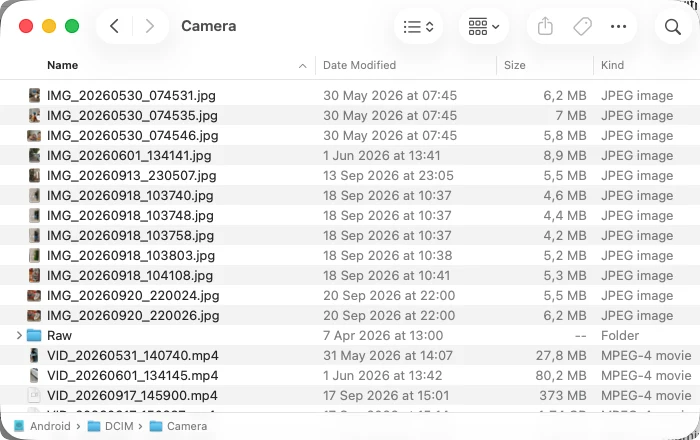
Summary
- What:
adbdavserves a phone's/sdcardas WebDAV on loopback and hands the URL to macOS's own/sbin/mount_webdav. The phone shows up as a normal volume — Finder,ls,rsync, any app. - Why it exists: no MTP on macOS, and macFUSE is a kernel extension.
- Cost: no kext, no reboot, no app on the phone, nothing on the network. Read-only by default.
- Source: olragon/adbdav (MIT, Go).
Finder ──webdav──> 127.0.0.1 (adbdav) ──adb──> device /sdcardProblem
Plug an Android phone into a Mac and there is no supported way to see its files.
MTP does not exist on macOS. Nothing built in, and Google's Android File Transfer is discontinued. On my phone's ROM I can set the USB mode to MTP and the system reverts it within seconds. There is nothing to fix there — the route is simply closed.
macFUSE works, but it is a kext. On Apple Silicon that means booting into Recovery and dropping to Reduced Security. My Mac runs 26 containers; "just reboot twice" is not a small ask, and on a managed Mac it may not be allowed at all.
Cloud apps want an app on the phone, an account, and a round trip through someone else's server to move a file between two devices on the same desk.
Meanwhile adb is sitting right there, already authorised, already moving bytes.
Solution
macOS ships a WebDAV client in the base system. It is userspace. It needs no extension and no reboot. So: speak WebDAV on loopback, translate it to adb, and let macOS mount it.
adbdav mount # mounts at ~/Android, read-only; Ctrl-C unmounts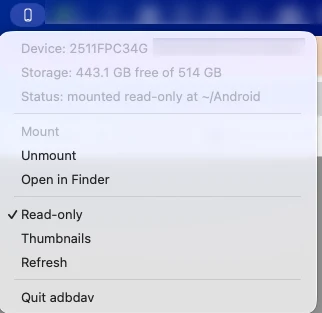
Read-only is the default, and it is enforced twice: the server refuses the method, and the volume is mounted -o ro so the kernel refuses it first. That second one is what makes Finder grey editing out instead of failing mid-drag.
What it costs
Reproduce with ./bench/bench.sh — read-only, 5 runs each, median.
| Operation | Measured | |---|---| | List a 76-entry directory, on the device itself | 0.142s | | ↳ PROPFIND Depth: 1, cold (fresh server) | 1.253s | | ↳ PROPFIND Depth: 1, warm | 0.001s | | ↳ PROPFIND Depth: 1, -cache 0 | 18.070s | | Read 77 MB through the mount | 6.600s (11.6 MB/s) | | ↳ the same file with adb exec-out cat | 11.8 MB/s |
Two things fall out of that.
The WebDAV layer is not the cost; adb is. A full-file read runs at the same MB/s as adb exec-out cat. There is no meaningful overhead left in the bridge.
Latency, not throughput, is what makes a phone feel slow. One adb round trip costs hundreds of milliseconds, so any design that performs one per file turns an ordinary folder into a half-minute stall. That is the 18-second row: the same code with the optimisations switched off.
Three round trips worth deleting
Each was measured, and each is now pinned by a test.
webdav.walkFS re-Stats every child after Readdir. A 76-entry directory costs 76 extra round trips — PROPFIND took 5.81s while the device answered the same question in 0.06s. A listing now primes each child's stat-cache entry.
webdav answers getcontenttype by opening the file and reading 512 bytes when the extension is unknown. 60 extension-less files cost 3.51s per PROPFIND. Implementing webdav's ContentType hook: 0.19s, no device read at all.
Spotlight and Quick Look will each read the entire phone. macOS probes a volume root for .metadata_never_index, .ql_disablethumbnails and .ql_disablecache. Serving all three as empty files that exist only in the server — never on the device — took a photo folder from "Finder hangs" to zero whole-file GETs.
Two things that cost me a day
adb exec-out always exits 0, whatever the device command did, and it merges the device's stderr into stdout. adb shell does propagate the status, but it allocates a pty that corrupts binary data. So every command carries its status back in-band and binary reads redirect stderr away. Get this wrong and a device error message is served to you as file content, and every failed write is invisible.
/sdcard is a symlink, and find does not descend into a symlinked argument. Without find -H, -mindepth 1 matches nothing. The symptom is strange: the volume mounts, every file is readable by its full path, and the directory reads as empty.
There is also a bug the benchmark found in the tool itself. -cache 0 is documented as disabling the cache, and session.New was quietly substituting a 2-second default for an unset TTL — so it never did. I only caught it because the first run reported a 0.9 ms PROPFIND against a 1.4-second device round trip. A benchmark that reports an impossible number is reporting a bug in itself, and it is worth stopping to find out which one. The other half of that lesson: assert the HTTP status before timing anything, or a connection refusal reads as sub-millisecond speed.
Limits
- Throughput is
adb's — ~11.7 MB/s here. Fine for photos and video; not a filesystem to compile on. - macOS's WebDAV client caches a whole file locally on open, so a multi-GB video means waiting for all of it.
- Metadata is cached for 5s by default, because Finder issues PROPFINDs in bursts. A change made on the phone can take that long to appear.
mtimeis not preserved on upload; permissions are synthesised.- Twice, under a benchmark saturating
adbin parallel, macOS unmounted the volume on its own. Nothing in adbdav unmounts it andwebdavfslogs nothing. I could not reproduce it deliberately, so it is a known limit rather than a fixed bug.
Source
github.com/olragon/adbdav — MIT. make check runs the tests with no phone attached.